Design notes for LiveTranscriber
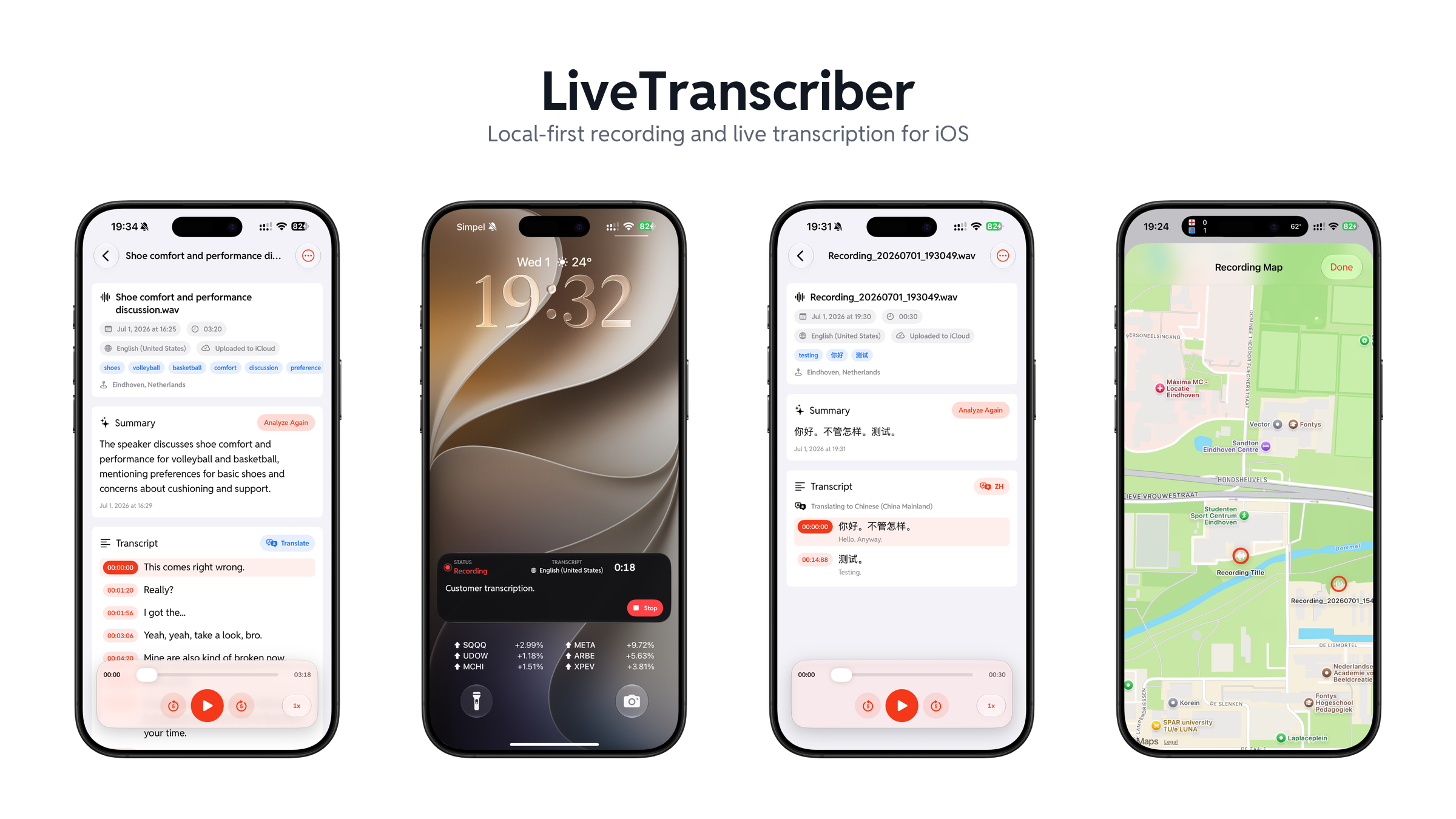
LiveTranscriber started as a focused iOS recorder with a transcript beside the audio. The current development version has grown into a local-first audio workspace: capture or import media, transcribe and translate it, review it through a time-linked transcript, organize it, and turn it into searchable notes and actions.
The app is still built around a small, native interaction model rather than a cloud dashboard. What changed is the depth of the workflow after recording.
Project: github.com/iamwilliamli/LiveTranscriber · TestFlight beta
The transcript is the interface
The central design idea is that a transcript should not be an attachment to an audio file. It should be the main way to navigate, understand, and retrieve the recording.
That idea now shapes the whole app:
- live transcript lines show what has been recognized while recording
- confirmed lines can be translated without waiting for the recording to end
- tapping a saved line seeks playback to its timestamp
- playback can keep the active transcript line in view
- search can reveal and highlight a matching transcript line, then open the recording at that point
- summaries, tags, key points, meeting notes, and chat all remain grounded in the saved transcript
The product still has three primary tabs—recording, recordings, and settings—but a saved recording is no longer a dead file. It becomes a small document with audio as its source of truth.
Capture once, use the audio twice
The recording pipeline uses AVCaptureSession and Stereo Capture. Each microphone buffer is fanned out into two paths:
microphone buffer
  -> stereo WAV or M4A file
  -> mono 16 kHz speech input
     -> Apple Speech or Local Whisper Live beta
This separation matters. The app preserves a useful stereo recording while giving the speech recognizer the mono input it expects. It does not rewrite the file after recording or apply hidden gain processing.
Apple Speech, through SpeechAnalyzer and SpeechTranscriber, remains the default live path. A downloaded Whisper model can instead power the optional Local Whisper Live beta. In both cases, final transcript lines can be translated during recording through Apple’s Translation framework.
The recording screen is deliberately restrained. It answers the questions that matter in the moment: whether recording is active, how long it has run, which language and format are selected, and what has been recognized. Pause, resume, and stop stay in a compact bottom dock; the transcript carries more information than a decorative waveform would.
Stopping still opens a save sheet instead of committing immediately. That moment now supports a title, category, key points, tags, optional generated title and summary, and opt-in location metadata. The user can add structure while the context is fresh or save quickly and organize later.
Transcription is a set of explicit paths
No single recognizer is best for every device, language, recording length, and privacy preference. LiveTranscriber therefore treats transcription as a set of visible choices rather than silently routing audio to whichever service is available.
| Path | Best fit | Data boundary |
|---|---|---|
| Apple Speech | Default live transcription and a convenient saved-audio pass | Apple system framework, processed on device after required language assets are available |
| Local Whisper Live beta | Offline live transcription with a selected downloaded model | On device |
| Local Whisper | Higher-accuracy re-transcription after recording | On device; model and optional Core ML encoder are downloaded on demand |
| Qwen3-ASR | Experimental re-transcription in the newest development build | On device; a 0.6B 4-bit MLX model and Silero VAD are downloaded on demand |
| Gemini Cloud | Verbatim post-processing with timestamps, speaker turns, summary, and meeting intelligence | Explicitly confirmed upload using the user’s own API key |
The latest Qwen3-ASR path is aimed at saved recordings rather than live capture. It converts audio to 16 kHz mono, uses voice activity detection to find speech, and processes bounded chunks so long recordings do not need to become one unmanageable inference request. Its model download is roughly 700 MB and can be removed from Settings.
All of these backends converge on the same timed-line representation. That keeps playback, search, translation, export, and editing independent of the model that produced the text.
The recordings tab became a library
As the archive grew, a flat list stopped being enough. The recordings tab now opens on categories. Categories can be created, renamed, recolored, assigned an SF Symbol, and reorganized without moving the underlying app-managed files. An uncategorized view keeps the system usable before the user creates any structure.
Search cuts across titles, language, tags, key points, transcript text, summaries, meeting analysis, and detected audio events. When the match is inside the transcript, the result shows the matching timestamp and highlighted text. Opening it takes the user directly to the relevant line and playback position.
The import boundary also became wider. Audio can arrive from Files or the system share/Open In flow, while a video selected from Photos can have its audio track extracted into an M4A recording. Imported media then enters the same library and can use the same transcription, analysis, organization, and export tools as a recording made in the app.
Location remains optional metadata rather than a requirement. Recordings that include it can be browsed on a map, while everything else works normally without location permission.
Playback and review
The detail screen now separates transcript work from AI analysis, while keeping playback available as the common context. The playback surface includes a sampled waveform, scrubbing, skip controls, playback speed, background playback, and system media controls. Transcript rows remain the more precise navigation layer: tap a timestamp to seek, edit a mistaken line, or lock the transcript before running another transcription pass.
Apple’s Sound Analysis framework can also classify non-speech events in a saved recording. Detected sounds are placed on the playback timeline, and selecting an event seeks to its time range. Speech is intentionally excluded from this layer because the transcript already represents it.
For reuse outside the app, the transcript can be exported as plain text, Markdown, SRT, WebVTT, or structured JSON. The Markdown and JSON forms can also carry recording metadata, summaries, and meeting analysis instead of flattening everything into one block of text.
Intelligence as a capability ladder
The app does not make one model a hard dependency. Summary, title, tag, meeting-analysis, and recording-chat features share a provider model with four choices:
- Automatic chooses Apple Intelligence when available, then falls back to a downloaded local Qwen3 model. It never selects a cloud provider.
- Apple Intelligence uses the system Foundation Models framework on eligible devices.
- Local Qwen3 runs a Qwen3 1.7B Q4 GGUF model through embedded
llama.cpp, which keeps intelligence features available on devices and in regions where Apple Intelligence is unavailable. - Gemini Cloud is an explicit bring-your-own-key option for users who want cloud processing.
This capability ladder is especially important for China-region iPhones and other unsupported Apple Intelligence configurations. Local summaries, tags, title suggestions, meeting notes, and recording Q&A remain possible after the user downloads the Qwen model.
Meeting analysis turns a transcript into a structured summary, action items, decisions, and open questions. Action items can be reviewed and added to Reminders. The recording chat uses transcript excerpts and the saved summary as context, and its answers are instructed to say when the recording does not contain the requested information.
Gemini adds a different trade-off. With explicit confirmation, it can process the original audio into a speaker-labeled timeline and generate meeting intelligence. Speaker colors and labels remain stable in the transcript UI, and the pre-Gemini transcript is kept so the user can restore it.
Local-first is a boundary, not a slogan
The first version of this post described LiveTranscriber as having no custom upload path. That is no longer the whole story, so the boundary is now made explicit in both the product and the UI.
By default:
- audio, transcripts, metadata, and chat history stay in app-private storage
- live recording uses Apple Speech or a downloaded local Whisper model
- local Whisper, Qwen3-ASR, Sound Analysis, and local Qwen inference run on the device
- there is no developer-operated backend, third-party analytics, advertising, or tracking
Optional features cross clearly labelled boundaries:
- iCloud moves app-managed audio and transcript files into an app-private iCloud container and syncs the SwiftData index through the user’s private CloudKit database
- model downloads contact their model hosts only when the user requests a download; downloaded model files are excluded from iCloud backup
- Gemini is used only when the user enables it and explicitly chooses it for an intelligence action or confirms cloud processing of a saved recording
- the Gemini API key is stored in Keychain, requests set
store: false, and temporary file uploads are deleted after processing on a best-effort basis
This is a more useful definition of local-first than pretending the app has no network features. Local processing is the default and the automatic fallback; cloud use is visible, optional, and initiated by the user.
System surfaces are part of the product
Recording often continues after the app leaves the foreground, so system integration is not an accessory feature. The Live Activity and Dynamic Island show elapsed time, recording state, language, transcript line count, and the latest final text, with a stop action that returns the draft to the save flow.
Quick recording can also start from a Control Center or Lock Screen control, Home Screen widgets, and app routes. Saved recordings are exposed as App Entities so Siri and Shortcuts can search recordings, open one, or read its saved summary or transcript. Spotlight indexing makes the archive discoverable without inventing a parallel search system.
The rule for these surfaces is the same as for the main UI: show stable state and provide one obvious next action. They should reduce the distance to recording or recall, not reproduce the whole app in miniature.

Chengqi (William) Li
My research interests include 3D perception, computer vision, and deep learning.